Physical Address
304 North Cardinal St.
Dorchester Center, MA 02124
Physical Address
304 North Cardinal St.
Dorchester Center, MA 02124

[FREEBIES SERIES #20]
Canva Magic Design AI is changing how people create visual content by making professional design faster, easier, and more accessible than ever before. Whether you’re a business owner, marketer, content creator, student, or freelancer, AI-powered design tools can help you turn ideas into polished graphics in just a few minutes.
In the past, creating attractive designs often required advanced software, design experience, and significant time. Today, artificial intelligence simplifies many of those tasks by generating layouts, suggesting styles, recommending color combinations, and organizing visual elements automatically. As a result, anyone can produce high-quality designs without starting from a blank canvas.
One of Canva’s most impressive innovations is Canva Magic Design AI. Instead of manually arranging every design element, users can simply describe what they want or upload an image, and Canva generates multiple design options that can be customized further. This dramatically reduces the time spent brainstorming layouts while helping users maintain a professional appearance across different projects.
The growing popularity of AI-assisted design is also changing the way businesses approach content creation. Social media graphics, presentations, marketing materials, flyers, and promotional videos can now be produced much faster, allowing teams to focus more on creativity and communication rather than repetitive design work.
In this guide, you’ll discover nine powerful ways Canva Magic Design AI can improve your workflow, increase productivity, and help you create better designs with confidence.
Canva Magic Design AI is an artificial intelligence feature within Canva that assists users in creating professionally designed layouts based on simple inputs.
Instead of designing every project manually, users can enter a prompt, upload an image, or choose content they want to transform. Canva then analyzes the information and automatically generates multiple design concepts that match the intended style and purpose.
The generated designs remain fully editable, giving users complete control over fonts, colors, graphics, images, and branding elements. Rather than replacing creativity, the AI acts as a creative assistant that accelerates the design process.
This combination of automation and customization makes Canva Magic Design AI useful for both beginners and experienced designers looking to work more efficiently.
Artificial intelligence has become an important part of today’s creative workflow. Instead of replacing designers, AI helps eliminate repetitive tasks so creators can spend more time refining ideas and communicating their message effectively.
For businesses, this means marketing campaigns can be produced more quickly while maintaining visual consistency. Teams can create presentations, advertisements, social media posts, product promotions, and educational materials without repeatedly starting new designs from scratch.
For individual creators, AI lowers the barrier to entry. People with limited design experience can now create attractive visual content that would previously have required professional skills.
As AI technology continues to improve, tools such as Canva Magic Design AI are becoming valuable productivity partners rather than simple design applications.
Starting with a blank page can often be the most difficult part of any creative project.
Canva Magic Design AI removes this obstacle by generating multiple professionally designed layouts within seconds. Instead of spending time deciding where to place images, headlines, or graphic elements, you receive ready-made concepts that can immediately serve as inspiration.
This allows you to move from idea to finished design much faster while maintaining a polished appearance.
One of the greatest advantages of AI-powered design is improved efficiency.
Tasks that once required extensive manual adjustments—such as arranging elements, selecting layouts, or balancing compositions—can now be completed automatically.
This allows creators to spend less time on repetitive work and more time refining content, improving messaging, and developing creative ideas.
Consistency plays a vital role in building a recognizable brand.
With Canva Magic Design AI, users can quickly generate marketing materials that maintain a similar visual style across multiple projects. By applying consistent colors, typography, and branding elements, businesses create a stronger identity that customers recognize more easily.
Whether you’re designing presentations, social media graphics, or promotional materials, visual consistency helps reinforce professionalism.
Even experienced designers occasionally experience creative blocks.
AI-generated layouts provide fresh perspectives that can spark new ideas and encourage experimentation with different compositions, styles, and design approaches.
Rather than replacing your creativity, Canva Magic Design AI expands the range of possibilities you can explore.
Marketing often requires a continuous stream of visual content.
Businesses regularly create promotional graphics, advertisements, product announcements, email banners, social media posts, presentations, and event promotions.
Instead of designing each item individually, Canva Magic Design AI accelerates production by providing ready-made layouts that only require light customization.
This makes it easier to maintain an active marketing presence while reducing production time.
Creating professional presentations can be surprisingly time-consuming.
From slide layouts to typography and image placement, every decision affects readability and audience engagement.
Canva Magic Design AI helps organize presentation content into visually balanced layouts, allowing users to focus on storytelling rather than formatting.
Not everyone has formal design training.
One of the biggest strengths of Canva Magic Design AI is making professional-looking graphics accessible to beginners.
Entrepreneurs, teachers, students, marketers, and small business owners can create attractive designs without needing advanced knowledge of graphic design principles or complex software.
Because AI generates multiple design variations in just a few moments, users can compare different styles before choosing the final version.
This encourages experimentation with layouts, typography, colors, and visual hierarchy while reducing the fear of making mistakes.
Exploring several alternatives often leads to stronger and more creative final designs.
Ultimately, the greatest benefit of Canva Magic Design AI is improved productivity.
By automating routine design tasks, creators can dedicate more energy to strategy, storytelling, branding, and audience engagement.
Whether you’re managing a business, creating educational materials, building digital products, or producing marketing campaigns, AI allows you to accomplish more work in less time while maintaining professional quality.
Although AI simplifies the design process, achieving excellent results still depends on thoughtful input and creative direction.
To make the most of Canva Magic Design AI:
Treat AI as a creative assistant rather than a replacement for your ideas.
While Canva Magic Design AI can dramatically improve productivity, relying on it without careful review may lead to inconsistent or generic results.
Some common mistakes include:
By combining AI-generated ideas with thoughtful editing and a clear branding strategy, you can create designs that not only look professional but also communicate your message effectively.
Mastering Modern Design: Designing Like a Pro with Canva’s Magic Design AI is a practical beginner-friendly eBook that introduces one of Canva’s most innovative AI-powered features. Whether you’re creating content for your business, social media, presentations, or digital products, this guide shows how Canva’s AI tools can simplify the design process and improve your workflow.
Instead of spending hours experimenting with layouts, colors, and design elements, you’ll learn how to use Canva Magic Design AI to generate professional-looking designs more efficiently while maintaining creativity and consistency.
This free eBook is suitable for entrepreneurs, marketers, content creators, educators, freelancers, and anyone who wants to take advantage of AI-powered design tools.
This resource is provided as a Personal Use License, unless otherwise stated on the download page.
When you download this free eBook, you’ll receive:
Learn how Canva’s AI-powered design features help streamline the creative process.
Discover techniques for creating attractive and professional graphics more efficiently.
Understand how artificial intelligence can reduce repetitive design tasks while improving productivity.
The content is written in an easy-to-follow format, making it suitable even if you’re new to Canva or AI-powered design.
Read the guide anytime on your computer, tablet, or mobile device.
Learning a new design tool can feel overwhelming, especially when AI introduces features that constantly evolve. This eBook provides a structured introduction to Canva Magic Design AI, helping you understand not only how the feature works but also how to apply it effectively in real-world projects.
You should download this guide if you want to:
Whether you’re creating content for your own business or designing for clients, this guide offers practical insights that can help you work more efficiently.
Ready to explore AI-powered design?
Download your free copy today.
Included in your download:
Get exclusive access and start seeing results today. It’s completely free!
If you’re interested in using artificial intelligence to improve your creativity and productivity, explore these related resources:
These guides and free resources will help you discover practical ways to use AI for content creation, business growth, marketing, and everyday productivity.
Enjoyed this free Canva guide?
Mastering Modern Design: Designing Like a Pro with Canva’s Magic Design AI is just one of the many resources included in the AI Domination Bundle.
The bundle contains an extensive collection of AI-focused eBooks and learning materials covering today’s most popular AI tools for business, creativity, marketing, and productivity. Whether you’re interested in AI writing assistants, image generation, automation, prompt engineering, or AI-powered design, you’ll find practical resources designed to help you learn faster and work more efficiently.
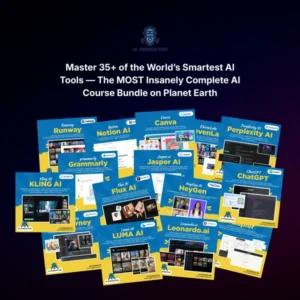
Inside the AI Domination Bundle, you’ll discover topics including:
Instead of purchasing multiple AI guides separately, you can access a comprehensive learning library that supports your AI journey from beginner to advanced applications.
👉 Explore the AI Domination Bundle
Canva Magic Design AI is changing the way people approach graphic design by making professional-quality visuals faster and more accessible than ever before. Rather than replacing creativity, AI serves as a powerful assistant that helps generate ideas, simplify repetitive tasks, and accelerate the design process.
If you’re looking for a practical way to understand this technology, Mastering Modern Design: Designing Like a Pro with Canva’s Magic Design AI provides an excellent starting point. As you continue exploring AI-powered tools and techniques, you’ll discover new opportunities to improve your creativity, strengthen your branding, and produce high-quality content more efficiently.


[…] 9 Powerful Ways Canva Magic Design AI Helps You Create Better Designs […]